

Arrays are one of the most popular data structures in Java, and they are designed to be fast. Even though arrays are objects in Java, they are still laid out in memory in a way that makes access very efficient.
In simple cases, accessing elements is cheap and predictable because array elements are laid out sequentially in memory.
However, a very small-looking difference like int[] versus Integer[] completely changes that picture, especially when you are dealing with large data. The way they are laid out in memory greatly affects memory usage, access cost, and overall performance.
In this blog post, we will look at what really changes between these two layouts, why there is a performance gap, and run a simple benchmark to confirm it.
It is important to note that this is not just about int and Integer. The same idea applies to other primitive arrays and object arrays as well.
The Real Structural Difference
It is true that arrays are contiguous structures in Java. However, storing primitive values and storing wrapper objects are two completely different things, and that difference affects performance.
Let us consider this:
int[] a = new int[1_000_000];
Integer[] b = new Integer[1_000_000];
It is easy to identify that one is an array of primitive int values and the other is an array of Integer objects. But the real difference comes from how they are stored in memory.
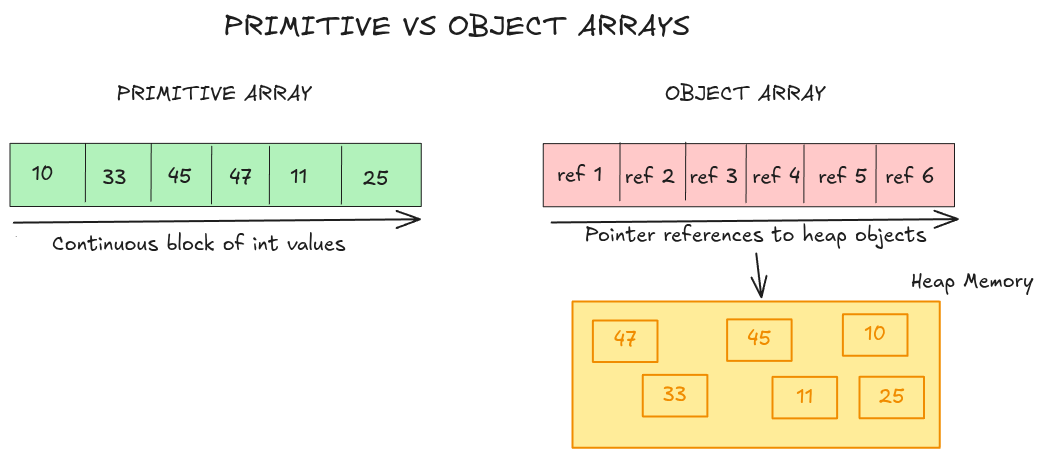
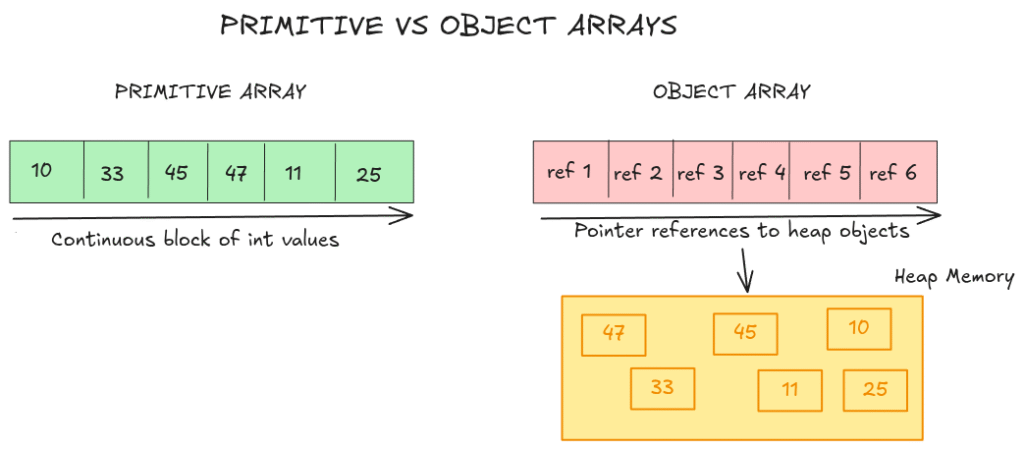
With int[], you get one array object holding a flat block of primitive values. That is to say, the actual int values are stored directly inside the array itself.
With Integer[], you also get one array object, but that array does not store the Integer objects themselves. It stores references to them. The actual Integer objects live somewhere else on the heap, and those objects are not necessarily contiguous or laid next to each other in memory.
This subtle structural difference has a significant performance impact when working with large data.
Where the Performance Difference Comes From
As explained earlier, with a primitive array, the values are already inside the array itself, so reading them is straightforward. This is also good for the CPU since it reads memory in cache lines, so with an int[], a single cache-line fetch can bring in multiple values the CPU is likely to need next, which makes access faster.
But with Integer[], since it holds only references, the JVM first reads the reference from the array and then has to locate the actual object somewhere else on the heap. And since those objects may be scattered in the heap, access becomes less predictable and more expensive. Also, since we are dealing with objects here, the memory usage is higher. We have the actual array holding references, plus the actual objects on the heap.
Benchmark: int[] vs Integer[] with JMH
We now run a simple benchmark where we measure two things.
First, we measure the cost of reading through both arrays and summing their values. This helps us see the access cost difference between primitive arrays and wrapper arrays.
Second, we measure the cost of building both arrays from scratch. This helps us see the allocation and memory overhead more clearly.
@BenchmarkMode(Mode.AverageTime)
@OutputTimeUnit(TimeUnit.MILLISECONDS)
@Warmup(iterations = 3, time = 2, timeUnit = TimeUnit.SECONDS)
@Measurement(iterations = 5, time = 2, timeUnit = TimeUnit.SECONDS)
@Fork(value = 2, jvmArgsAppend = {"-Xms2g", "-Xmx2g"})
@State(Scope.Thread)
public class IntVsIntegerArrayBenchmark {

    @Param({"100000", "1000000"})
    int n;

    private int[] ints;
    private Integer[] boxed;

    @Setup(Level.Trial)
    public void setup() {
        ints = new int[n];
        boxed = new Integer[n];

        for (int i = 0; i < n; i++) {
            int v = i + 1024;
            ints[i] = v;
            boxed[i] = v;
        }
    }

    @Benchmark
    public long sumInts() {
        long sum = 0;
        int[] local = ints;
        for (int i = 0; i < local.length; i++) {
            sum += local[i];
        }
        return sum;
    }

    @Benchmark
    public long sumBoxed() {
        long sum = 0;
        Integer[] local = boxed;
        for (int i = 0; i < local.length; i++) {
            sum += local[i];
        }
        return sum;
    }

    @Benchmark
    public int[] buildInts() {
        int[] a = new int[n];
        for (int i = 0; i < n; i++) {
            a[i] = i + 1024;
        }
        return a;
    }

    @Benchmark
    public Integer[] buildBoxed() {
        Integer[] a = new Integer[n];
        for (int i = 0; i < n; i++) {
            a[i] = i + 1024;
        }
        return a;
    }
}
You can run it with:
java -jar target/benchmarks.jar IntVsIntegerArrayBenchmark -prof gc
Results
From our results, the difference is very clear. On the read path, int[] is consistently faster than Integer[]. At n = 100,000, sumInts() takes 0.011 ms/op while sumBoxed() takes 0.036 ms/op, and at n = 1,000,000, the gap becomes even larger: 0.101 ms/op vs 0.820 ms/op. . Since there is almost no GC activity in these sum benchmarks, this slowdown mainly comes from the access pattern itself, not allocation.
In the benchmark for building the arrays, Integer[] is also much more expensive. At n = 1,000,000, buildInts() takes 0.838 ms/op and allocates about 4 MB/op, while buildBoxed() takes 11.338 ms/op and allocates about 20 MB/op. This confirms that Integer[] is not only slower to read from, but also far heavier to build because it creates many separate objects and puts much more pressure on memory.
Conclusion
In this blog post, we have seen that the difference between int[] and Integer[] is not just a type difference, but a memory layout difference. With int[], the values are stored directly inside the array, while with Integer[], the array stores references to separate Integer objects. This makes access more expensive and also increases memory usage, especially when dealing with large data. So, when you are working with non-null numeric data such as IDs, counts, scores, timestamps, or coordinates, and performance matters, keep it as primitives instead of turning it into objects.