

Let’s imagine you have designed an application that processes thousands of JSON requests per second. While doing a simple heap analysis, you discover that memory usage is much higher than expected, not caused by large caches or complex objects, but because of ordinary strings repeated again and again across requests.
This is very common. In many applications, strings represent a significant portion of heap usage, often 25% or more. What is even more interesting is that a thorough investigation shows most of those strings are duplicated. You could have thousands, if not millions, of exactly the same string loaded from your database or your API calls.
Whether it is a status like “COMPLETED”, a country code like “USA”, or a category name, each one exists as a separate object on the heap. Each one has its own separate byte array, even though they are exactly the same string. The result is unnecessary memory usage and more GC activity than your application should be dealing with.
In this post, we explore the limitations of String.intern() and a JVM feature called G1 String Deduplication that is often overlooked. It can reduce this kind of memory waste automatically, without requiring code changes.
What String.intern() Actually Does
String.intern() checks a shared pool maintained by the JVM. If a string with the same content already exists in that pool, it returns the existing instance. If not, it adds your string to the pool and returns it.
The result of interning is that two variables with the same string content can end up pointing to the same object in memory.
Note that here we are dealing not just with the backing array, but the whole String object. When you call intern(), you are effectively changing the reference of your local variable to point to the address of the pooled object.
// 1. Your JSON parser creates a BRAND NEW string object
String categoryA = jsonParser.getNextString(); // points to address 0x111 ("ELECTRONICS")
String categoryB = jsonParser.getNextString(); // points to address 0x222 ("ELECTRONICS")

System.out.println(categoryA == categoryB); // false — two different objects in memory

// 2. You intern them to point to the same global instance
categoryA = categoryA.intern(); // now points to the pooled address 0x999
categoryB = categoryB.intern(); // also points to 0x999

System.out.println(categoryA == categoryB); // true — same pooled object
The Hidden Cost of String.intern()
1. Slower Lookups as the Pool Grows
String.intern() works by checking the JVM’s global string pool to see whether a string already exists. This gets more costly as you intern more strings, because the pool keeps growing. As it grows, lookups become more expensive. So instead of only saving memory, you also add more CPU work.
2. More GC Work
The intern pool also adds GC work. The JVM has to scan and process that pool during garbage collection. If the pool becomes large, GC has more work to do, which can increase pause time and make collection more expensive overall.
3. Thread Contention Under Load
The string pool is shared across the whole JVM. So when many threads call intern() at the same time, they all end up hitting the same shared structure. That creates contention inside the JVM, and under heavy load it can become a bottleneck.
This is especially noticeable in high-throughput applications, where many threads are processing the same kinds of values again and again, such as JSON field names, status values, or category names. Instead of just reducing memory usage, intern() can also introduce extra coordination cost at runtime.
What G1 String Deduplication Actually Does
G1 Garbage Collector has a feature called String Deduplication. You enable it with -XX:+UseStringDeduplication.
Unlike String.intern(), it does not try to make equal strings become the same String object. Instead, it keeps the String objects separate, but makes them share the same internal backing array.
So, with intern(), two variables can end up pointing to the exact same String object. Meanwhile, with G1 String Deduplication, the two variables still point to two different String objects, but those objects can share the same underlying character data.
How a String Looks in Memory
A String object does not store the text directly inside itself. It stores a reference to an internal array that contains the actual data.
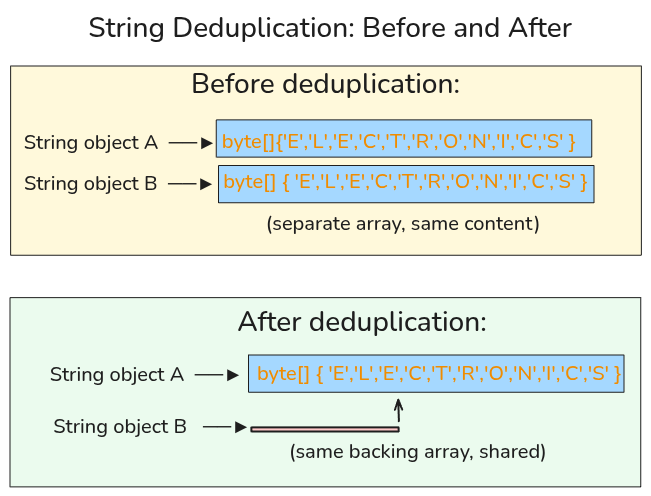
So if your application keeps reading the category "ELECTRONICS" again and again, you can end up with something like this:
Before deduplication:
String object A  ──►  byte[] { 'E','L','E','C','T','R','O','N','I','C','S' }
String object B  ──►  byte[] { 'E','L','E','C','T','R','O','N','I','C','S' }
                           (separate array, same content)
After deduplication:
String object A  ──►  byte[] { 'E','L','E','C','T','R','O','N','I','C','S' }
String object B  ────────────────────────────────────────────────────────────┘
                           (same backing array, shared)
The two String objects are still different objects. Your references do not change. What changes is that they no longer carry duplicate internal arrays. This is exactly how memory is being saved.
How the G1 Collector Optimizes String Storage
As mentioned earlier, you do not need to change your code. The G1 garbage collector does the work for you.
It first looks for String objects that are worth deduplicating. Very short-lived strings are usually ignored, because they will likely be collected soon anyway. By default, a string must survive a few GC cycles before it becomes a candidate.
Once a string becomes a candidate, G1 adds it to an internal deduplication queue. A background deduplication thread then processes the strings in that queue.
If it finds two strings whose backing arrays contain the same data, such as two different "ELECTRONICS" values, it updates one of them to reuse the array already used by the other.
The duplicate array is then no longer needed, and the garbage collector can reclaim it later.
Why This Is Different from intern()
This is the key distinction: intern() makes equal strings share the same String object. G1 String Deduplication makes equal strings share the same backing array, while still keeping them as separate String objects. So you still reduce memory usage, but without pushing intern() calls into your hot path.
Enabling and Observing String Deduplication
To enable string deduplication use : -XX:+UseStringDeduplication. Note this only work with G1 garbage collector. On Java 8, G1 must be enabled explicitly with -XX:+UseG1GC
# Java 8
java -XX:+UseG1GC -XX:+UseStringDeduplication -jar your-app.jar

# Java 9+
java -XX:+UseStringDeduplication -jar your-app.jar
Configuring the Deduplication Threshold
By default, a string becomes eligible for deduplication only after it has survived enough GC cycles. That threshold is controlled by -XX:StringDeduplicationAgeThreshold, and the default value is 3.
-XX:StringDeduplicationAgeThreshold=5
A higher value means G1 waits longer before trying to deduplicate a string. That reduces unnecessary work on short-lived strings, but it also means deduplication happens later.
Demonstrating Deduplication
Let’s use this example to illustrate deduplication in action. This is exactly what happens when your API receives multiple requests containing identical strings.
public class StringDedupObservationDemo {

    private static String readCategory() {
        byte[] raw = "ELECTRONICS".getBytes(StandardCharsets.UTF_8);
        return new String(raw, StandardCharsets.UTF_8);
    }

    public static void main(String[] args) throws Exception {
        List<String> live = new ArrayList<>();

        // Keep many duplicate strings alive
        for (int i = 0; i < 300_000; i++) {
            live.add(readCategory());
        }

        // Create temporary allocation pressure so GC runs naturally
        for (int round = 0; round < 15; round++) {
            List<String> burst = new ArrayList<>();
            for (int i = 0; i < 200_000; i++) {
                burst.add(readCategory());
            }
            Thread.sleep(200);
        }

        System.out.println("Kept " + live.size() + " duplicate strings alive");
        Thread.sleep(15000);
    }
}
Compile the code with javac StringDedupObservationDemo.java and then run with :
java -Xms128m -Xmx128m \
-XX:+UseStringDeduplication \
-XX:StringDeduplicationAgeThreshold=1 \
'-Xlog:stringdedup*=debug' \
StringDedupObservationDemo
From the result, we can see that G1 String Deduplication is actually working. The JVM inspects the duplicate strings, recognizes that many of them already contain known content, and deduplicates their backing arrays instead of keeping separate copies in memory.
In this run, the JVM inspected 3 million string candidates, successfully deduplicated 100% of them, and recovered about 93 MB of heap space., while the deduplication table held only 61 unique values. This clearly shows us that G1 String Deduplication can remove a huge amount of duplicate string storage automatically, without any code changes in the application.
Conclusion
If your goal is to reduce duplicate string memory across an application, G1 String Deduplication is usually the better tool. It works automatically, stays out of your hot path, and can recover a meaningful amount of heap without requiring code changes.
String.intern() still has its place, but mostly when you have a small set of known repeated values and you want to force them to share one instance. For large amounts of strings coming from JSON, APIs, or databases, G1 String Deduplication is usually the cleaner and more practical choice.