

I am sure you have written this in your Java code: List<Type> list = new ArrayList<>(); Countless times, I will say.
That is normal. ArrayList is one of the most popular data structures in Java and in most situations, this is perfectly fine.
But what happens when you now have to add a large amount of data into that list? Like 10,000 users from a database, or a big batch you are transforming into DTOs? We are going to answer that in this blog post.
It is common knowledge that add() on an ArrayList is O(1), so people assume: “adding is cheap” But that statement is not fully true. ArrayList.add() is not guaranteed O(1) every time. It is amortized O(1).
We will answer what that means and the impact it has when creating an arraylist.
The “O(1)” Promise vs. The Reality
When we say ArrayList.add() is amortized O(1), what we mean is this: Most of the time, add() is cheap but occasionally, add() becomes expensive, and in that moment it is no longer O(1). It becomes O(n).
Why O(n)? Because Java has to copy n existing references to a new array before it can continue.
Java makes that expensive moment rare, so most of the time we ignore it. But it is still important to know when it happens and why it happens, especially when you are adding a lot of data in one go.
The “lazy” start: new ArrayList<>() does not allocate capacity immediately
When you create a list like this: List<Type> list = new ArrayList<>();the backing array does not start with a fix size as new Object[10]. It starts “empty” internally (capacity = 0).
Then on the first add(), Java inflates it to a real array of at least 10.
It means you can create many lists and pay almost nothing if:
- they stay empty
- or they stay small meaning they only ever hold a few elements and never trigger many resizes
Why the expensive add happens: arrays are fixed-size
An ArrayList is backed by an array. and arrays have fixed size. So the moment you reach the current capacity of that internal array, Java cannot “just keep appending”. This is where the pause happens:
- Allocate a bigger array
- Add your new element
- Copy the old array (references) into the new one
That copying step is the expensive part. And that is why the slow add() is O(n).
How capacity grows (so resizes become rarer)
ArrayList grows by roughly 50% each time it needs more space. So capacity moves like: 10 → 15 → 22 → 33 → 49 → 73 → …
That means resizes are not constant and as the list gets bigger, they happen less frequently. But each resize is more expensive, because you are copying a bigger array each time.
Because those expensive copies do not happen on every add(). Across a long run of inserts, the total work of all copies is spread out. So even though some adds are O(n), the average cost per add over many inserts behaves like a constant hence the O(1).
When should you actually pass a capacity?
It is true that resizing does not happen on every add(), but when it does happen it can show up as random jitters, extra allocations, and extra GC work. So new ArrayList<>(n) is not something you do everywhere. It is something you do when your workload size is predictable.
1) DB reads and batch loads
If you already know how many rows you are pulling from the DB (or at least the upper bound), and you are going to add them into a list, then not specifying capacity is basically letting resizes happen for no reason.
Example: fetch 10,000 rows and map to DTOs, or load a page with a known limit.
List<UserDTO> dtos = new ArrayList<>(rows.size());
for (UserRow r : rows) {
    dtos.add(map(r));
}
2) You’re building a list from another collection you already have
Here, you already have a collection in memory (maybe List<Order> orders), and you are converting it to something else (DTOs, view models, summaries, ids, anything).
List<OrderDTO> dtos = new ArrayList<>(orders.size());
for (Order o : orders) {
    dtos.add(toDto(o));
}
3) Tight loops or hot code paths
If this list-building logic runs in a tight loop, or on a path that is hit constantly (per request, per message, per event), then avoiding resizes helps keep the execution more stable and predictable.
What to keep in mind
Only pass a capacity when you have a reasonable estimate. Also, capacity is not the size of the list. It only reserves slots upfront. The list only grows again when you try to add an element beyond that capacity, meaning element number capacity + 1.
Benchmark: does pre-sizing an ArrayList actually matter?
We will run a small JMH benchmark with n = 10,000, and we build the exact same list in three different ways:
new ArrayList<>()(default growth)new ArrayList<>(n)(pre-sized)new ArrayList<>()+ensureCapacity(n)(reserve capacity first, then add)
@BenchmarkMode(Mode.AverageTime)
@OutputTimeUnit(TimeUnit.MICROSECONDS)
@Warmup(iterations = 5, time = 3, timeUnit = TimeUnit.SECONDS)
@Measurement(iterations = 10, time = 3, timeUnit = TimeUnit.SECONDS)
@Fork(2)
@State(Scope.Thread)
public class ArrayListCapacityBenchmark {

    @Param("100000")
    int n;

    Object item;

    @Setup(Level.Trial)
    public void setup() {
        item = new Object();
    }

    @Benchmark
    public void defaultCtor(Blackhole bh) {
        ArrayList<Object> list = new ArrayList<>();
        for (int i = 0; i < n; i++) {
            list.add(item);
        }
        bh.consume(list);
    }

    @Benchmark
    public void preSized(Blackhole bh) {
        ArrayList<Object> list = new ArrayList<>(n);
        for (int i = 0; i < n; i++) {
            list.add(item);
        }
        bh.consume(list);
    }

    @Benchmark
    public void ensureCapacity(Blackhole bh) {
        ArrayList<Object> list = new ArrayList<>();
        list.ensureCapacity(n);
        for (int i = 0; i < n; i++) {
            list.add(item);
        }
        bh.consume(list);
    }
}
Results summary
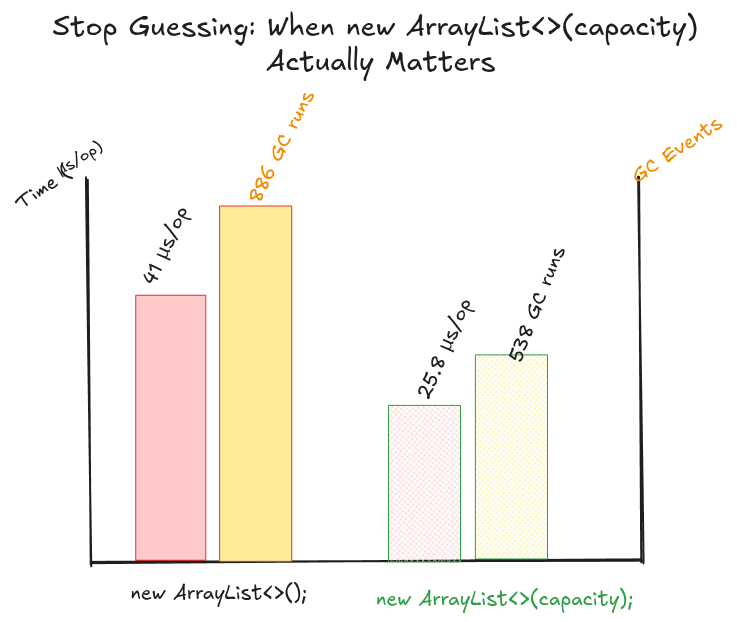
For our benchmark with n = 10,000, new ArrayList<>() performs worst: it runs around 41 µs/op and triggers a lot more GC work (886 GC runs, 641 ms total GC time), because the list keeps growing and copying as it resizes. Both ensureCapacity(10_000) and new ArrayList<>(10_000) avoid most of that by reserving space up front, which drops allocations from about 169 KB/op to about 40 KB/op, reduces GC activity (538 runs / 351 ms for ensureCapacity, 488 runs / 303 ms for pre-sized), and improves runtime to about 25.8 µs/op and 28.5 µs/op respectively.
Conclusion
From our post, the ArrayList.add() is only “O(1)” when nothing forces a resize. However, when the capacity runs out, Java pauses, allocates a new array, and copies everything over.
So if you are dumping a predictable batch into a list (DB rows, DTO transformation, hot loops), pre-sizing with new ArrayList<>(n) or calling ensureCapacity(n) is a simple way to avoid needless copying and extra GC work.
In a normal small list, you don’t need to worry about any of this. But if the size is obvious, there is no reason to let the list keep growing blindly.